Over 3.4 billion fraudulent emails are sent every day. Learn to identify them, protect your inbox, and shield your company's digital security before it's too late.
The term phishing derives from "fishing" — and the analogy is perfect: cybercriminals cast a hook disguised as legitimate communication — a bank, a payment platform, your software provider — waiting for someone to bite.
The goal is always the same: obtain sensitive information. Passwords, banking details, access to corporate email accounts, cloud service credentials. Once they get it, the damage can be enormous — from direct financial losses to compromising an entire company's digital infrastructure.
What makes modern phishing especially dangerous is its level of personalization. These are no longer generic emails with clumsy typos and pixelated logos. Attackers research their targets on LinkedIn, social networks, and company websites, crafting messages that appear completely legitimate.
Suspicious sender address
The name may say "Chase Bank" but the actual address ends in @chase-support.net or something similar. Always click the sender's name to see the full domain.
Exaggerated urgency
"Your account will be suspended in 24 hours." Time pressure is a classic tactic to prevent you from thinking calmly before acting.
Unexpected attachments
Invoices, contracts, or receipts you weren't expecting. Especially dangerous in .exe, .zip, .docm, or .xlsm formats that may contain malicious macros.
Writing errors
Though increasingly rare thanks to AI, strange translations, poor spelling, or incoherent phrases remain a valid warning sign.
Request for sensitive data
No legitimate company will ever ask for passwords, full card numbers, or verification codes via email. Never. Ever.
Link mismatchHover over the link before clicking. If the real URL does not match the company it claims to be, it is a clear warning sign.Look for domains with subtle mistakes:Paypał.com,goggle.com,amaz0n.com.
Did you notice the mistakes???
Below is a typical example of a fraudulent email impersonating a banking institution. Every signal marked in orange is a red flag that should stop you in your tracks.
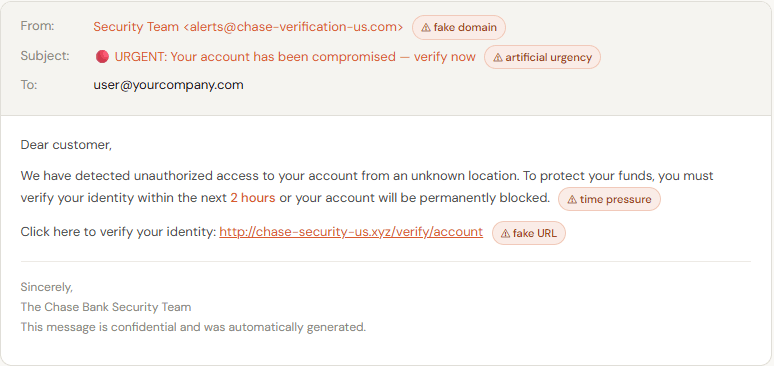
This email looks credible at first glance, but it contains four clear alarm signals. A real bank will never ask you to verify your account by email with a deadline of just a few hours.
Technology helps, but the first line of defense is always you and your team. Here are concrete measures, ordered by impact, that make a real difference:
✓ Enable two-factor authentication (2FA) on all critical accounts: email, online banking, server access, and admin panels. It's the single measure with the best effort-to-protection ratio that exists.
✓ Use unique passwords for every service. A password manager like Bitwarden (free and open source) or 1Password eliminates the excuse of "I can't memorize that many different passwords."
✓ Always verify the sender's domain, not just the visible name in the inbox. Click on the sender's name to expand and see the full email address before replying or clicking any link.
✓ Configure SPF, DKIM, and DMARC records on your company's domain. These email authentication protocols make it significantly harder for third parties to send emails impersonating your organization.
✓ Train your team regularly. The weakest link in cybersecurity is always human. A workshop or simulation exercise once a year can drastically reduce the likelihood of a real incident.
✓ Enable advanced anti-phishing filters in your corporate email client. Google Workspace, Microsoft 365, and most enterprise providers have advanced security options worth reviewing and activating.
✓ Establish a protocol for bank transfers. Any payment or transfer requested via email must be verified by phone with the requesting person before execution — no exceptions, regardless of the sender's title.
Technical tools fail when the human factor is not up to date. Join the culture of digital prevention with the analyses and recommendations we share on the blog of LunAvalos.